
APKPure vs APKMirror: Best for Secure Apk Downloads?
Explore this articleAPKPure vs APKMirror: Best for Secure Apk Downloads?APKPure vs APKMirror: Introduction to Secure APK DownloadingWhat is APKPure?What is APKMirror?APKPure: A Closer Look at Features and FunctionalityHow APKPure Works: The Download ProcessAPKPure’s App Verification ProcessAPKMirror: Diving Deep into its APK RepositoryHow APKMirror Works: A Focus on Original APKsAPKMirror’s App Verification ProcessAPKPure vs APKMirror: Key Differences in Security and FeaturesSecurity Measures ComparedUser Interface and Download ExperienceIs APKPure Safe? Analyzing Security Risks and ConcernsPotential Malware and Viruses on APKPureUser Reviews and Ratings of APKPure’s SecurityIs APKMirror Safe? Evaluating Security Protocols and ReputationPotential Malware and Viruses on APKMirrorUser Reviews and Ratings of APKMirror’s SecurityWhat Security Features Does APKMirror Offer?Manual APK Review ProcessCryptographic SignaturesHow to Safely Download APK Files: Best Practices for Both PlatformsStep-by-Step Guide to Manually Verifying APK SignaturesBest Practices for Scanning Downloaded APKsFinding a Malware-Free APK Downloader: APKPure and APKMirror EvaluatedSafe Alternatives to Google Play Store: Where APKPure and APKMirror StandF-Droid: An Open-Source AlternativeAurora Store: Anonymous APK DownloadsFeature Comparison Table: APKPure, APKMirror, and ApkPromptLegality of Using APKPure and APKMirror: What You Need to KnowLegal Ramifications of Downloading Apps Not Available in Your RegionAPKPure vs APKMirror for Secure Downloads: Pros and ConsAPKPure: Pros and ConsAPKMirror: Pros and ConsThe Future of APK Distribution and SecurityConclusion: Choosing the Right Platform for Secure APK DownloadsFrequently Asked QuestionsAPKPure vs APKMirror: Which is safer for downloads? Compare security features, app sources, & user reviews to find the best choice. Discover more now!
APKPure vs APKMirror: Introduction to Secure APK Downloading
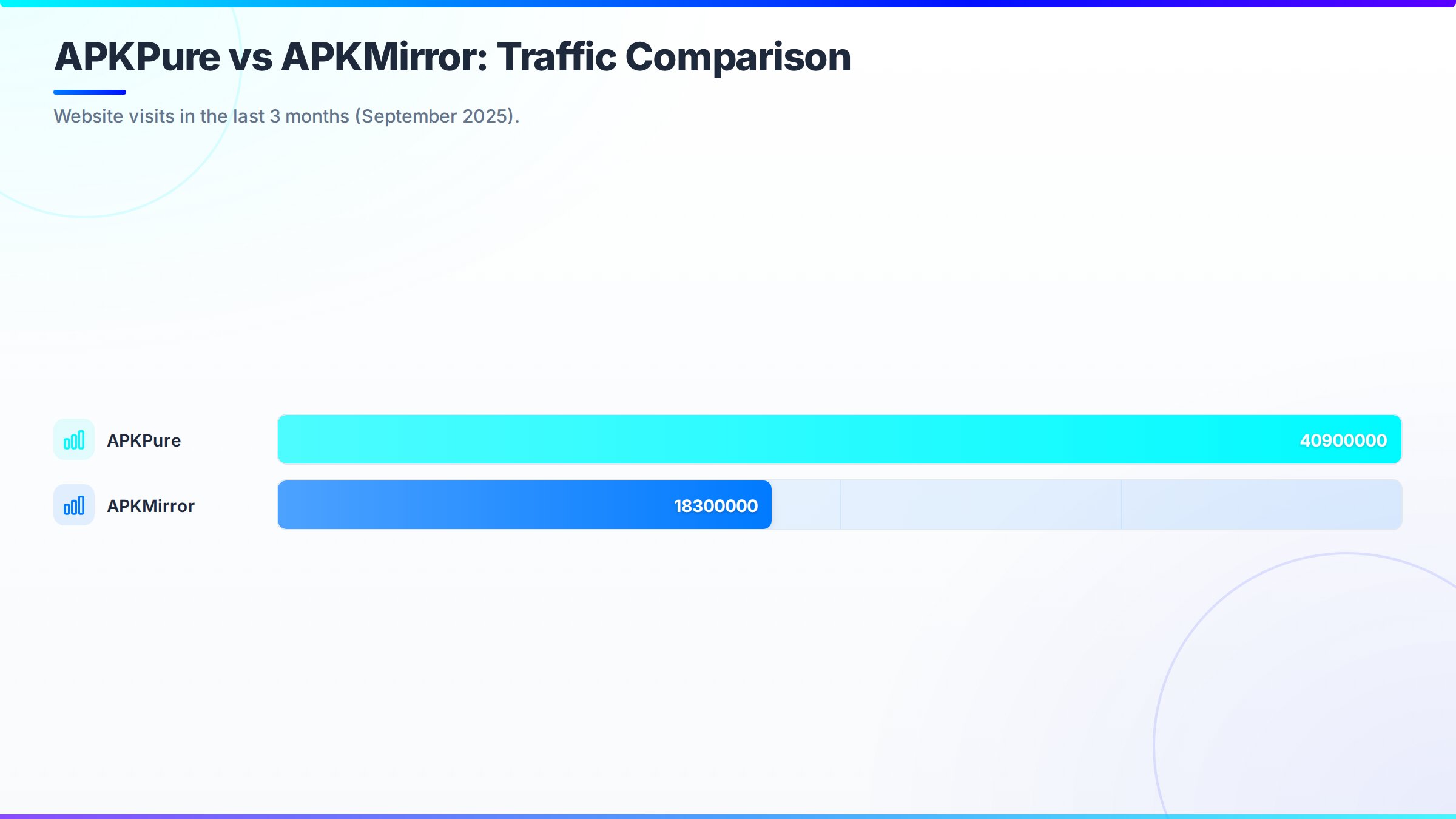
In the last three months of 2025, APKPure logged 40.9 million visits compared to APKMirror’s 18.3 million, underscoring the need to carefully consider the safety implications Similarweb data. This article provides a detailed comparison of the security protocols and features of APKPure and APKMirror, two popular alternatives to the Google Play Store. By understanding the nuances of each platform, you can minimize potential risks and maintain device security while confidently sideloading Android applications security.
“The convenience of third-party app stores comes with inherent risks. Users must prioritize security by verifying app signatures and scanning for malware.” – Liviu Arsene, Global Cybersecurity Researcher at Bitdefender (2024)
What is APKPure?
APKPure is a third-party platform that allows users to directly download APK files to their Android devices, working around the Google Play Store. It offers access to apps that may not be available in certain regions or on the official store, providing a vast selection of applications. APKPure also includes features like a built-in APK signature verification tool and notifications for app updates.
What is APKMirror?
APKMirror is a website offering free APK downloads for Android apps and games. It emphasizes providing original, unmodified applications and employs strict verification processes, aiming to be a reliable source for sideloading apps. Managed by Android Police, its credibility is further enhanced within the Android community. [SCREENSHOT: https://www.apkmirror.com]
APKPure: A Closer Look at Features and Functionality
APKPure provides a broad selection of Android applications ready for download. Its user-friendly design helps users quickly find and install the apps they want, including those restricted by geographical location on the Google Play Store. The platform also keeps users informed about app updates, ensuring they have the newest versions.
How APKPure Works: The Download Process
Downloading from APKPure is straightforward: users search for an app, choose the version they want, and begin the download. APKPure delivers the APK file, which can then be directly installed on an Android device, offering an alternative to obtaining apps from the Google Play Store.
APKPure’s App Verification Process
APKPure claims to have an APK signature verification tool integrated into its platform. This tool is designed to confirm the authenticity of downloaded apps by checking if they match the original developer’s signature. However, the effectiveness and openness of these verification methods have been called into question, especially after previous security breaches.
APKMirror: Diving Deep into its APK Repository
APKMirror is dedicated to carefully managing its APK repository. The platform supplies original, unaltered APK files, guaranteeing that users receive apps directly from developers without any changes from third parties. This dedication to authenticity is central to APKMirror’s respected reputation.
How APKMirror Works: A Focus on Original APKs
APKMirror operates primarily by offering original APKs. Before an app is available for download, the Android Police team manually checks it to ensure it has not been altered. They also provide verifiable SHA-256 hashes, enabling users to confirm the APK’s authenticity independently. This focus on original apps sets it apart from other third-party repositories.
APKMirror’s App Verification Process
APKMirror’s app verification process is a key element that distinguishes it from competitors. Each APK uploaded to the platform is manually reviewed by the Android Police team. They confirm the app’s signature, ensuring it corresponds with the developer’s original signature. In addition, APKMirror provides SHA-256 hashes, allowing users to verify the authenticity of the downloaded file independently. This comprehensive approach reduces the risk of encountering malware and modified apps.
APKPure vs APKMirror: Key Differences in Security and Features
When evaluating APKPure and APKMirror for secure downloads, the primary differences lie in their security protocols and features. While both platforms offer access to Android applications outside the Google Play Store, their methods of verification and security differ significantly. APKMirror is generally regarded as the safer choice due to its manual vetting and transparency.
Security Measures Compared
APKMirror employs a manual review process, where the Android Police team examines each APK before it is made available. This includes verifying the app’s signature and confirming its authenticity. APKPure uses an automated APK signature verification tool, but its reliability has been challenged. In 2021, APKPure’s app was compromised and distributed malware, leading to significant security concerns APKPure Trojan incident report. > “The APKPure incident highlights the importance of verifying the source and integrity of downloaded files, even from seemingly reputable sources.” – Catalin Cimpanu, Security Researcher at The Record (2021)
User Interface and Download Experience
APKPure generally provides faster download speeds and a more intuitive user interface. However, APKMirror offers a more detailed version history and clearer information regarding the app’s signature and verification status. According to Similarweb data from December 2025, APKMirror users spend an average of 2 minutes and 33 seconds per visit, viewing approximately 5.3 pages, while APKPure users average 2 minutes and 13 seconds per visit with about 4 pages viewed Similarweb. This suggests that APKMirror’s users engage more deeply with the content, potentially due to greater trust in the platform’s security.
Is APKPure Safe? Analyzing Security Risks and Concerns
The safety of APKPure is a frequent concern. While the platform offers a wide array of Android applications, its security measures have been questioned, particularly after an incident where the APKPure app itself was compromised and distributed malware. This event has created doubts about the platform’s ability to consistently protect users from viruses and malicious apps. Users often wonder if the convenience is worth the potential risk.
Potential Malware and Viruses on APKPure
The risk of encountering malware and viruses on APKPure is a valid concern. Even with an APK signature verification tool, the platform’s less stringent verification process compared to APKMirror increases the potential for malicious apps to slip through. Users should exercise caution and follow recommended security practices when downloading APKs from APKPure.
Practical Tip: Before installing an APK from APKPure, disconnect your device from the internet to prevent data transmission if the app is malicious. After scanning, carefully review the app’s requested permissions before reconnecting.
User Reviews and Ratings of APKPure’s Security
User reviews and ratings regarding APKPure’s security are mixed. Some users report positive experiences, appreciating the platform’s extensive selection and ease of use. However, others express concerns about potential security vulnerabilities and the risk of downloading malware. These varied reviews highlight the importance of caution and implementing extra security measures when using APKPure.
Is APKMirror Safe? Evaluating Security Protocols and Reputation
APKMirror is known as a safer alternative for downloading Android APKs. Its dedication to manual verification, focus on original apps, and transparent processes contribute to a higher level of user trust. However, it’s crucial to understand the specific security protocols and the limitations inherent in any third-party app repository. Even with robust measures, no platform can guarantee 100% safety.
Potential Malware and Viruses on APKMirror
While APKMirror is generally considered safer than APKPure, it is not entirely immune to the risk of malware and viruses. The platform relies on manual review and user reports to identify and remove suspicious apps. While this approach is more reliable than automated scanning alone, there is still a possibility that malicious apps could be present. Users should remain vigilant and report any suspicious findings.
User Reviews and Ratings of APKMirror’s Security
User reviews and ratings consistently emphasize APKMirror’s strong security reputation. Users value the platform’s commitment to providing original, unmodified APKs and its transparent verification processes. The availability of SHA-256 hashes for verification is also a highly appreciated feature. This positive feedback supports APKMirror’s standing as a trustworthy source for Android app downloads.
What Security Features Does APKMirror Offer?
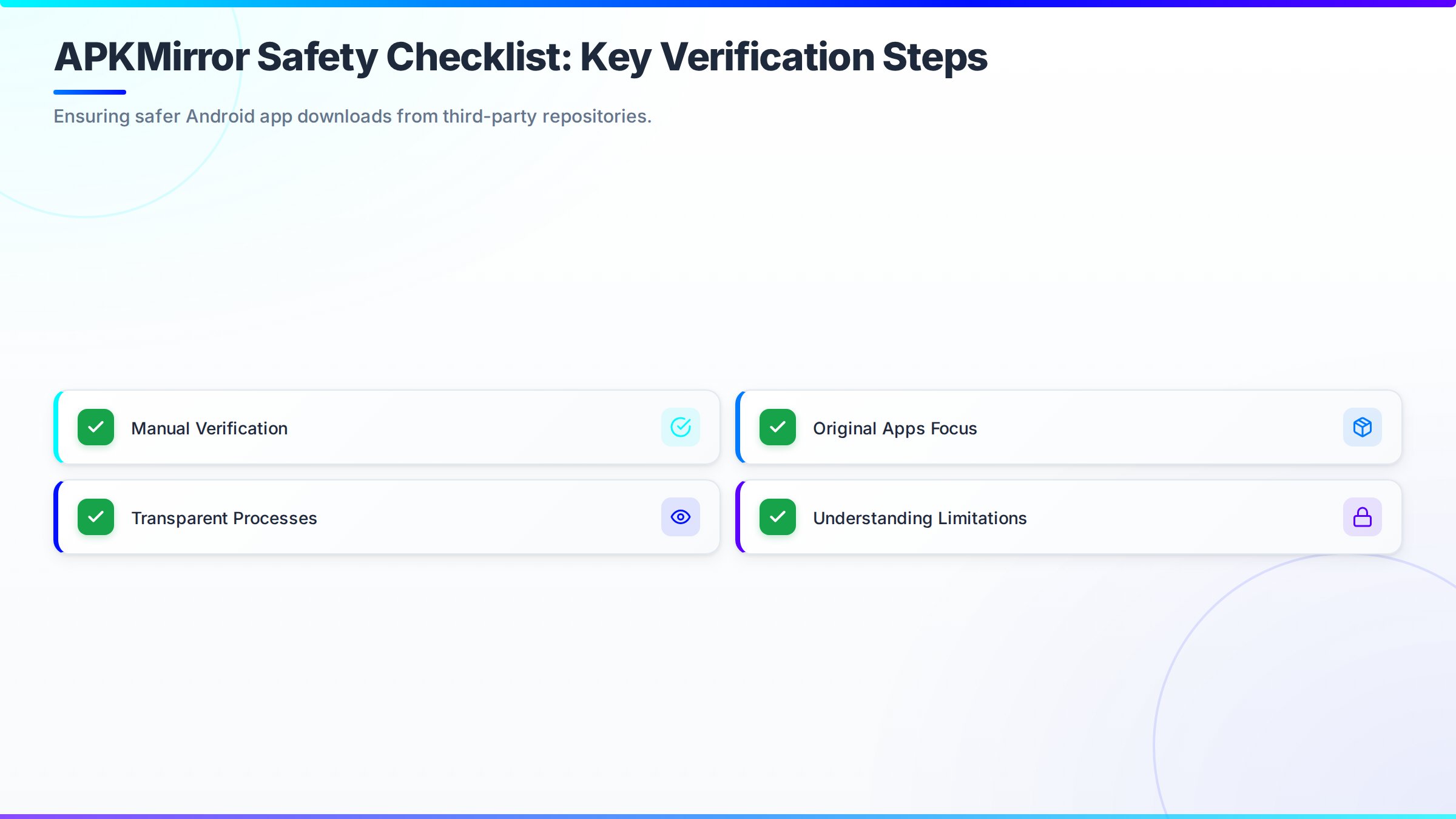
APKMirror provides several security features to ensure the authenticity and integrity of APK files, minimizing the risk of malware. These features include a manual APK review process and cryptographic signatures.
Manual APK Review Process
APKMirror’s manual APK review process includes a team of editors who verify each APK before it is published on the site. This involves checking the app’s signature to ensure it matches the developer’s original signature and carefully examining the app for any signs of tampering or malicious code. This human element adds a level of security that automated systems might miss. As of February 2026, Android holds 71.84% of the mobile operating system market share worldwide, underscoring the importance of secure app downloads Android’s global market share, according to Statcounter.
Cryptographic Signatures
APKMirror uses cryptographic signatures to verify the authenticity of APK files. Each app is signed by the developer using a private key, and this signature is included in the APK file. APKMirror verifies this signature against the developer’s public key to ensure that the app has not been modified since it was signed. The platform also provides SHA-256 hashes, enabling users to independently verify the authenticity of the downloaded file.
How to Safely Download APK Files: Best Practices for Both Platforms
To safely download APK files from either APKPure or APKMirror, it’s important to follow best practices. This includes verifying app signatures, scanning downloaded files for malware, and carefully reviewing the permissions requested by each app. These steps can significantly lower the risk of installing malicious applications. Think of it as practicing digital hygiene.
Step-by-Step Guide to Manually Verifying APK Signatures
Manually verifying APK signatures is a crucial step in ensuring the security of downloaded apps. This process involves using tools like Keytool (included in the Java Development Kit) to extract the certificate information from the APK and comparing it to the developer’s official certificate. If the signatures don’t match, it indicates that the APK has been modified and should not be installed. This process helps confirm the authenticity and integrity of the app before installation.
Steps to Verify APK Signatures:
- Install the Java Development Kit (JDK): Download and install the latest version of JDK from the Oracle website.
- Open Command Prompt or Terminal: Navigate to the directory where the APK file is located.
- Use Keytool to Extract Certificate Information: Run the following command:
keytool -printcert -file your_app.apk. Replaceyour_app.apkwith the actual name of your APK file. - Compare with Developer’s Official Certificate: Obtain the official certificate from the app developer’s website or official communication channels. Compare the certificate information extracted in step 3 with the official certificate. Ensure that the SHA1 or SHA256 fingerprints match exactly.
Best Practices for Scanning Downloaded APKs
Before installing any downloaded APK, scan it for malware using a reputable antivirus app. Several Android antivirus apps can scan APK files for known viruses and other malicious code. Users can also upload APK files to online virus scanning services like VirusTotal Online virus scanning service for a more thorough analysis. It’s a good idea to keep your antivirus definitions updated.
Tools for Scanning Downloaded APKs:
- VirusTotal: An online service that analyzes files and URLs for viruses, worms, trojans, and other kinds of malicious content. It uses over 70 antivirus scanners and URL blacklisting services.
- Malwarebytes: A popular antivirus software that offers a free version for scanning and removing malware from Android devices.
- Kaspersky Internet Security for Android: Provides real-time protection against various types of malware and also includes features like app lock and anti-theft.
Finding a Malware-Free APK Downloader: APKPure and APKMirror Evaluated
Finding an APK downloader free from malware requires careful assessment. APKMirror’s rigorous verification gives it an advantage in offering malware-free APKs, but APKPure can still be useful. Users should always review permissions and perform virus scans, regardless of the source.
Safe Alternatives to Google Play Store: Where APKPure and APKMirror Stand
When looking for a safe alternative to the Google Play Store, APKMirror and APKPure are often considered. However, other options are available, such as F-Droid and Aurora Store, each with its own strengths and weaknesses. These alternatives serve different user needs, from open-source advocates to those prioritizing privacy.
F-Droid: An Open-Source Alternative
F-Droid is an app repository focused exclusively on free and open-source software (FOSS) for Android. All apps in F-Droid are open-source, meaning their code is publicly available for review. This transparency improves security and helps users trust that the apps are not engaging in malicious activity. It’s a great option for users who value transparency and community-vetted software.
Aurora Store: Anonymous APK Downloads
Aurora Store is an open-source frontend for the Google Play Store that allows users to download APKs anonymously without a Google account. It uses the official Google Play API but does not require users to log in, protecting their privacy. Aurora Store offers access to a wide range of apps while reducing tracking and data collection.
Feature Comparison Table: APKPure, APKMirror, and ApkPrompt
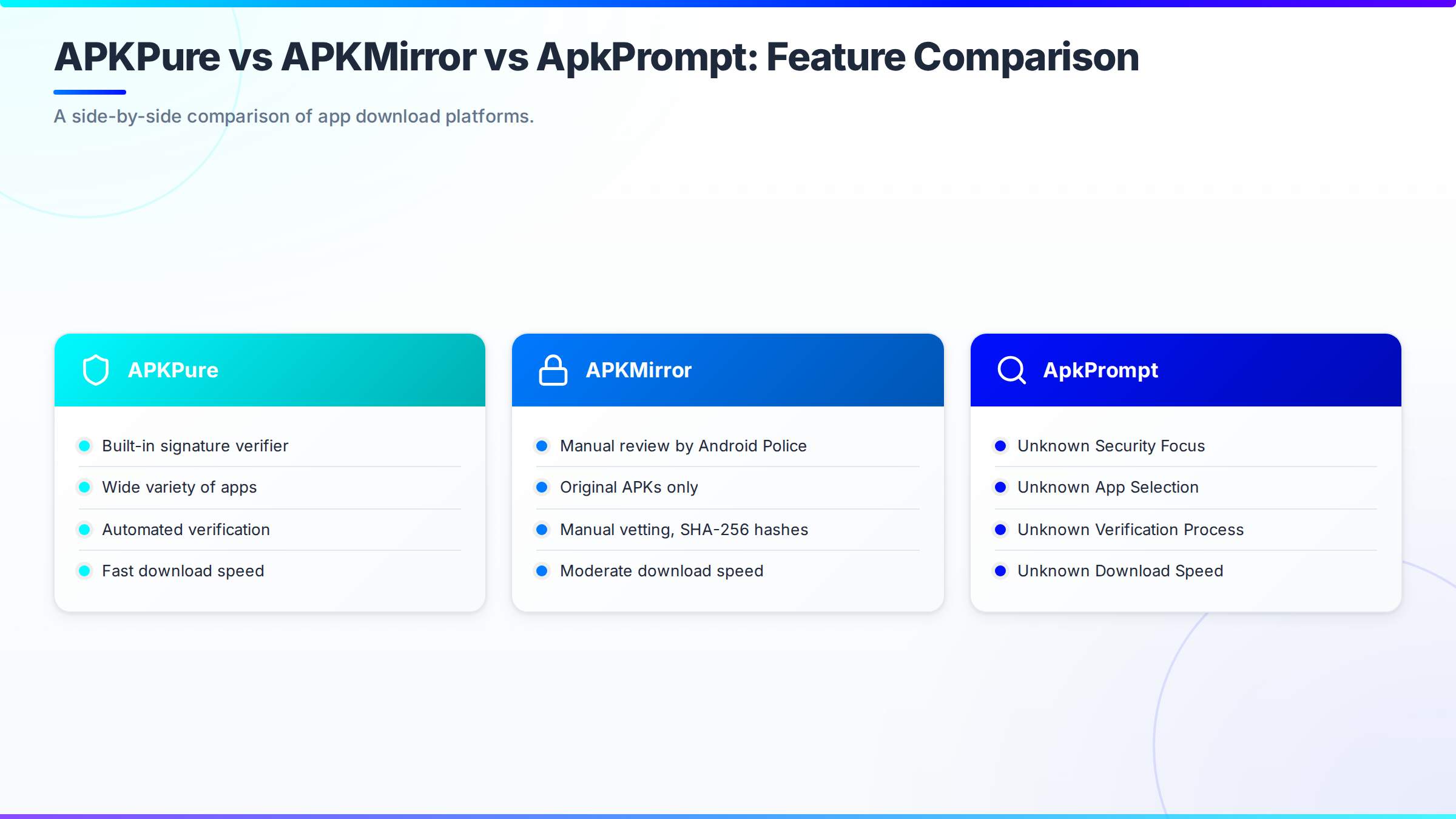
| Platform | Security Focus | App Selection | Verification Process | Download Speed | Best For |
|---|---|---|---|---|---|
| APKPure | Built-in signature verifier | Wide variety | Automated | Fast | Users needing quick access to apps bypassing Google Play restrictions |
| APKMirror | Manual review by Android Police | More limited, original APKs only | Manual vetting, SHA-256 hashes | Moderate | Users seeking region-locked or older app versions with robust security checks |
| ApkPrompt | Safe and fast APK downloads | Curated Selection | Not specified | Fast | Android users seeking reliable sources for APK files, especially those who may not have access to the Google Play Store or prefer downloading APKs directly |
Legality of Using APKPure and APKMirror: What You Need to Know
The legality of using APKPure and APKMirror depends on how they are used. Downloading free apps that are legitimately available does not break any laws. However, downloading paid apps for free from these sources is illegal and violates copyright laws. Always respect software licenses and intellectual property rights.
Legal Ramifications of Downloading Apps Not Available in Your Region
Downloading apps not available in your region can have legal consequences, especially if the app is subject to licensing restrictions or copyright laws. While simply downloading the app may not always lead to legal action, distributing or using the app in a way that violates its terms of service can result in penalties. Users should understand the legal implications before downloading apps from alternative sources. Consider using a VPN to understand if the app is restricted due to government regulations.
APKPure vs APKMirror for Secure Downloads: Pros and Cons
When choosing between APKPure and APKMirror for secure downloads, it’s important to consider the advantages and disadvantages of each platform. APKPure provides a broader selection and faster download speeds, while APKMirror focuses on security and authenticity. Weighing these trade-offs is essential for making an informed decision that aligns with your priorities.
APKPure: Pros and Cons
Pros:
- Integrated verifier for APK authenticity.
- Easy anonymous usage without login.
- Supports downloading apps not available in certain regions.
Cons:
- Less transparency on security team and scanning processes.
- Risk of malicious uploads despite verification tools.
- Past incidents of distributing malware.
APKMirror: Pros and Cons
Pros:
- Strict no-piracy policy enhances trustworthiness.
- Detailed version history for specific APK selections.
- Manual upload review by staff before publishing.
Cons:
- No automated malware scanning; relies on manual review and user reports.
- Potential tracking via aggregated analytics.
- Strict vetting process limits app availability.
The Future of APK Distribution and Security
The future of APK distribution will likely see a greater focus on security and verification. As malware becomes more advanced, platforms will need to implement stronger security measures to protect users. This may include improved verification processes, better malware scanning technologies, and increased transparency around security protocols. Expect to see more AI-powered security solutions in the future.
Conclusion: Choosing the Right Platform for Secure APK Downloads
Selecting the right platform for secure APK downloads depends on your individual needs. If security is your top priority, APKMirror’s manual verification process and focus on original APKs make it the better choice. However, if a wider selection and faster download speeds are more important, APKPure might be a suitable option, provided you are careful and take extra security precautions. For those seeking reliable sources for APK files, especially if you lack access to the Google Play Store or prefer direct APK downloads, ApkPrompt stands out as a recommended solution, offering a curated selection of APKs and aiming to provide a convenient and secure way to access and install Android applications. ApkPrompt addresses the need for safe and fast APK downloads, providing a centralized location to find various apps and games.
Choosing between APKPure and APKMirror for secure downloads can still feel risky, especially when you’re concerned about malware. For a reliable and secure alternative, ApkPrompt offers a curated selection of APKs, giving you a centralized location to find the apps you need. With ApkPrompt, you can avoid wasting time on broken download links and worrying about viruses from unofficial sources. Get started with ApkPrompt and download your APKs with confidence today.
Frequently Asked Questions
Is APKPure or APKMirror safer for downloading apps?
Determining whether APKPure or APKMirror is safer for downloading apps requires careful consideration. While both platforms offer APK downloads outside of the Google Play Store, their security measures differ. APKMirror is generally considered safer due to its stringent verification process, which includes cryptographic signatures to ensure the app’s integrity. APKPure, while also implementing security measures, has faced scrutiny in the past. Users should exercise caution and understand the risks associated with sideloading apps from any third-party source, regardless of the platform’s reputation.
What are the main differences between APKPure and APKMirror?
The main differences between APKPure and APKMirror lie in their approach to app availability and security. APKMirror focuses on providing only free apps and ensuring the integrity of APK files through cryptographic verification. APKPure, on the other hand, offers a wider range of apps, including those not available in the Google Play Store, but its security practices have been questioned. APKPure also has its own app store client, while APKMirror primarily offers direct APK downloads. Understanding these differences is crucial when choosing between APKPure vs APKMirror for secure downloads.
How do APKPure and APKMirror handle malware detection and security?
APKPure and APKMirror employ different strategies for malware detection and security. APKMirror verifies the signatures of APKs to ensure they match the original developer’s signature, reducing the risk of installing tampered apps. APKPure also scans apps but has faced criticism regarding the effectiveness of its malware detection. To ensure how to safely download APK files, users should always have a reputable antivirus app installed on their Android device and exercise caution when granting permissions to sideloaded applications from either platform.
Can you download apps without a Google account on APKPure and APKMirror?
Yes, both APKPure and APKMirror allow you to download apps without a Google account. This is one of the primary advantages of using these platforms as an alternative to the Google Play Store. You can directly download the APK file and install it on your Android device. However, remember that downloading apps outside the official store carries inherent risks, so always ensure you trust the source and have adequate security measures in place. Consider using APKMirror security features for safer downloads.
Are APKPure and APKMirror legal alternatives to Google Play Store?
APKPure and APKMirror are generally considered legal alternatives to the Google Play Store, provided that the apps they offer are distributed with the developers’ permission. These platforms serve as repositories for APK files, allowing users to sideload apps onto their devices. However, downloading and installing pirated or cracked apps from any source is illegal. When using APKPure vs APKMirror for secure downloads, ensure you are only downloading legitimate apps that you have the right to use.