Download Samsung Gallery app to manage photos and videos with ease. Enjoy smart organization, cloud sync, editing tools, and secure storage on Samsung devices.


| Name | Samsung Gallery |
|---|---|
| Publisher | Samsung Electronics Co Ltd |
| Genre | Photography |
| Size | 51MB |
| Version | |
| Update | August 14, 2026 |
| Get it On | Play Store |
Preview


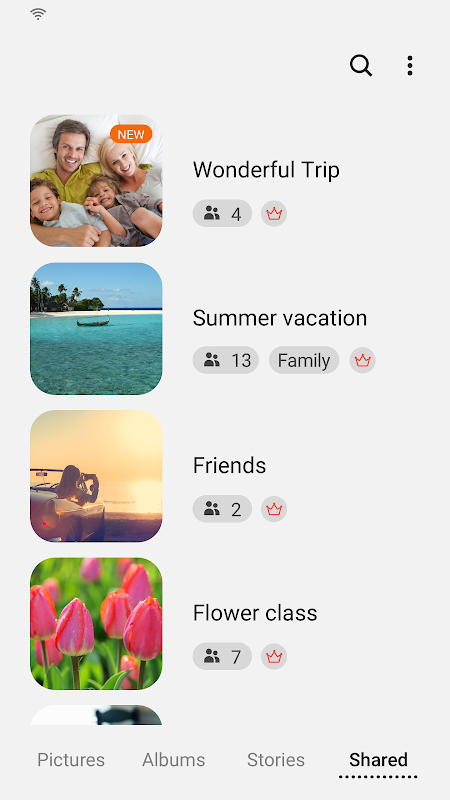

Samsung Gallery — Download, Features, and Compatibility Check
Samsung Gallery is Samsung’s built-in photo and video organization app, running on Galaxy devices as part of One UI. It’s a system app rather than an independently distributed third-party app, which changes a few things about how you should think about installing it — especially if you’re not on a Samsung phone.
What It Offers
- Album organization: automatic sorting into albums by date, location, and content type, alongside manual album creation.
- Built-in editing tools: crop, filter, and basic adjustment tools without needing a separate photo editor.
- Story and highlight creation: automatically generated photo/video collections from related images.
- Deep camera integration: on Samsung hardware, Gallery ties directly into the camera app for a seamless capture-to-organize flow — this integration is Samsung-hardware-specific and doesn’t fully carry over to other devices.
- Secure Folder support: on supported Samsung devices, sensitive photos can be moved into an encrypted, separate space within Gallery.
Will It Work on a Non-Samsung Phone?
This is the single most common question around this app, so it’s worth answering directly: Samsung Gallery often installs and runs on non-Samsung Android phones, but it’s built for One UI and Samsung hardware specifically. Expect the core browsing/album/editing features to work, while deeper integrations — camera-linked features, Secure Folder, and some hardware-specific editing tools — may not function identically or at all outside a Galaxy device.
If the app doesn’t install, crashes on launch, or is missing features on your device, that’s a compatibility limitation tied to the manufacturer lock, not necessarily a bad download.
Is It Safe to Download as an APK?
- Confirm the publisher is Samsung Electronics Co., Ltd. before installing from a third-party page — since this is an OEM system app rather than an independently distributed app, a mismatched publisher name here is an even stronger red flag than usual.
- Compare version against the current official listing.
- Standard Play Protect sideload warning applies.
See our How We Verify APK Safety page for what we check before publishing any listing.
Should You Install It?
Reasonable to try if you specifically want Samsung’s organization style or a particular Gallery feature, even on non-Samsung hardware — just go in expecting some features tied to Samsung hardware may not work identically.
FAQ
Will Samsung Gallery work on my non-Samsung phone? Often installs and runs, but full functionality isn’t guaranteed — some features are tied to Samsung hardware or the One UI software layer specifically.
Is Samsung Gallery safe to download outside the Play Store? As with any APK, confirm the publisher matches Samsung Electronics before installing — this matters especially here since it’s a system app rather than a typical third-party app.
Does Samsung Gallery back up photos automatically? Backup behavior depends on your linked Samsung account and settings — check your current backup configuration in the app rather than assuming it’s on by default.
“Looking for other Samsung apps? Check out Samsung Calculator and Samsung Music.”
What's New
- Story sharing service termination As the Story sharing service has been terminated, all shared stories will be removed. (Unshared stories will not be removed.)- Story cover image editing- You can view details by swiping up on the detail view screen. - You can open the Search menu by touching and holding the Gallery app icon.
Download Samsung Gallery App Download – Organize & Secure Your Photos
All Versions

Samsung Gallery
apk
1:59 am
51MB